
Parking Violations Detection
Classifies parking images to identify compliant parking and visible violations, including handicap misuse, double-parking, fire-lane blocking, and other parking violations.

datasciencealliance-org.image-classify.detect-parking-violations:latest
Prompt
Analyze the image and classify the parking situation into exactly one of the following labels:
Compliant
Handicap_Misuse
Double_Parking
Fire_Lane
Other_Violation
TASK
Determine whether a vehicle is parked normally and legally based only on visible evidence in the image.
...Run the full prompt in your EyePop.ai dashboard
Input
Image
Output
Predicted class
Image size
640x640
Model type
QWEN3 - Better Accuracy

How It Works
As its name implies, the Classify Image task on the Abilities tab classifies an input image into a category. We can use this to determine whether a vehicle is parked appropriately or is involved in a visible parking violation. Detecting parking violations can be useful for commercial properties, parking facilities, and other managed spaces where improperly parked vehicles may block access, occupy restricted areas, interfere with traffic flow, or create safety concerns.
For example, an image showing a vehicle properly positioned within a legal parking space with no visible restrictions should be classified as Compliant.
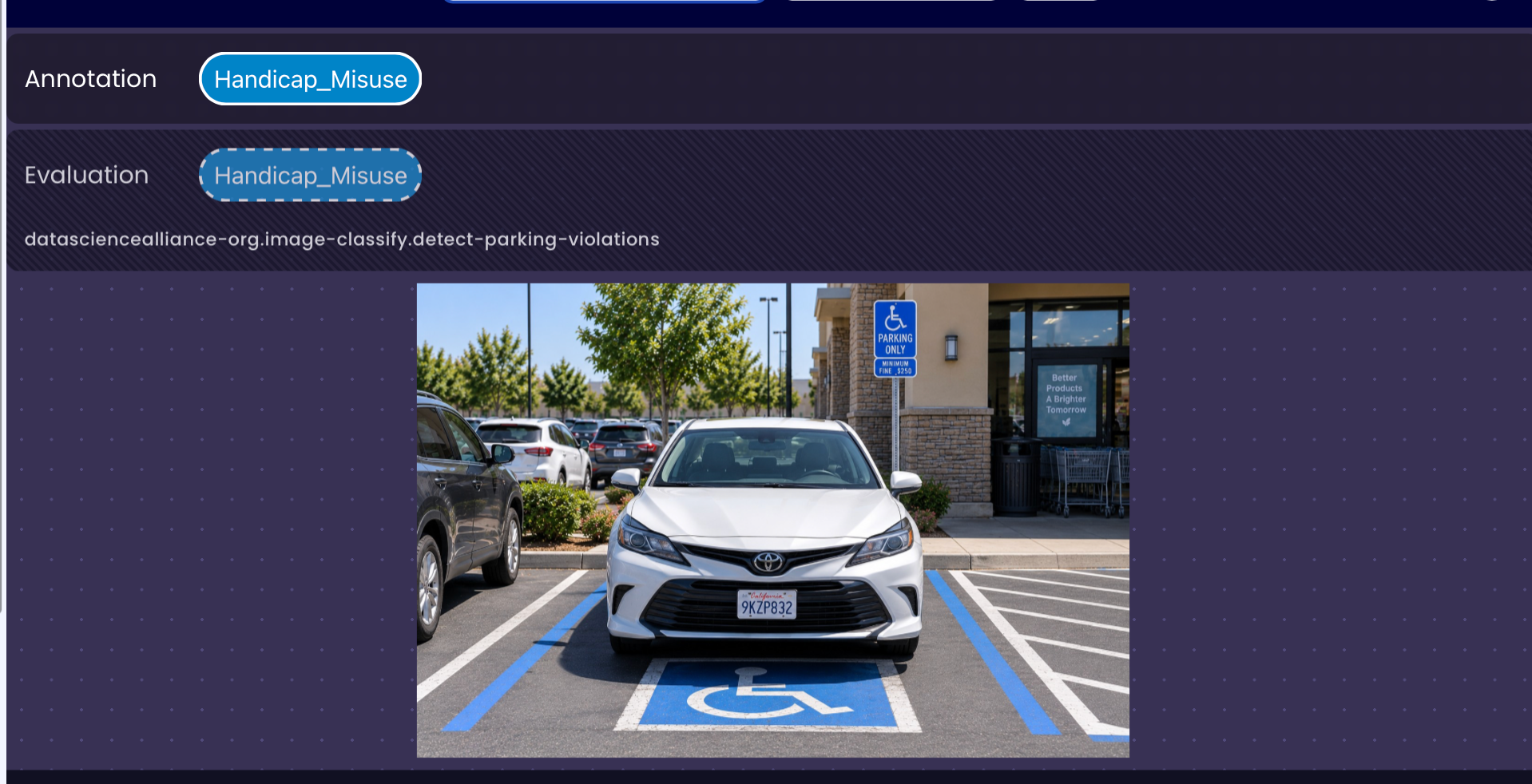
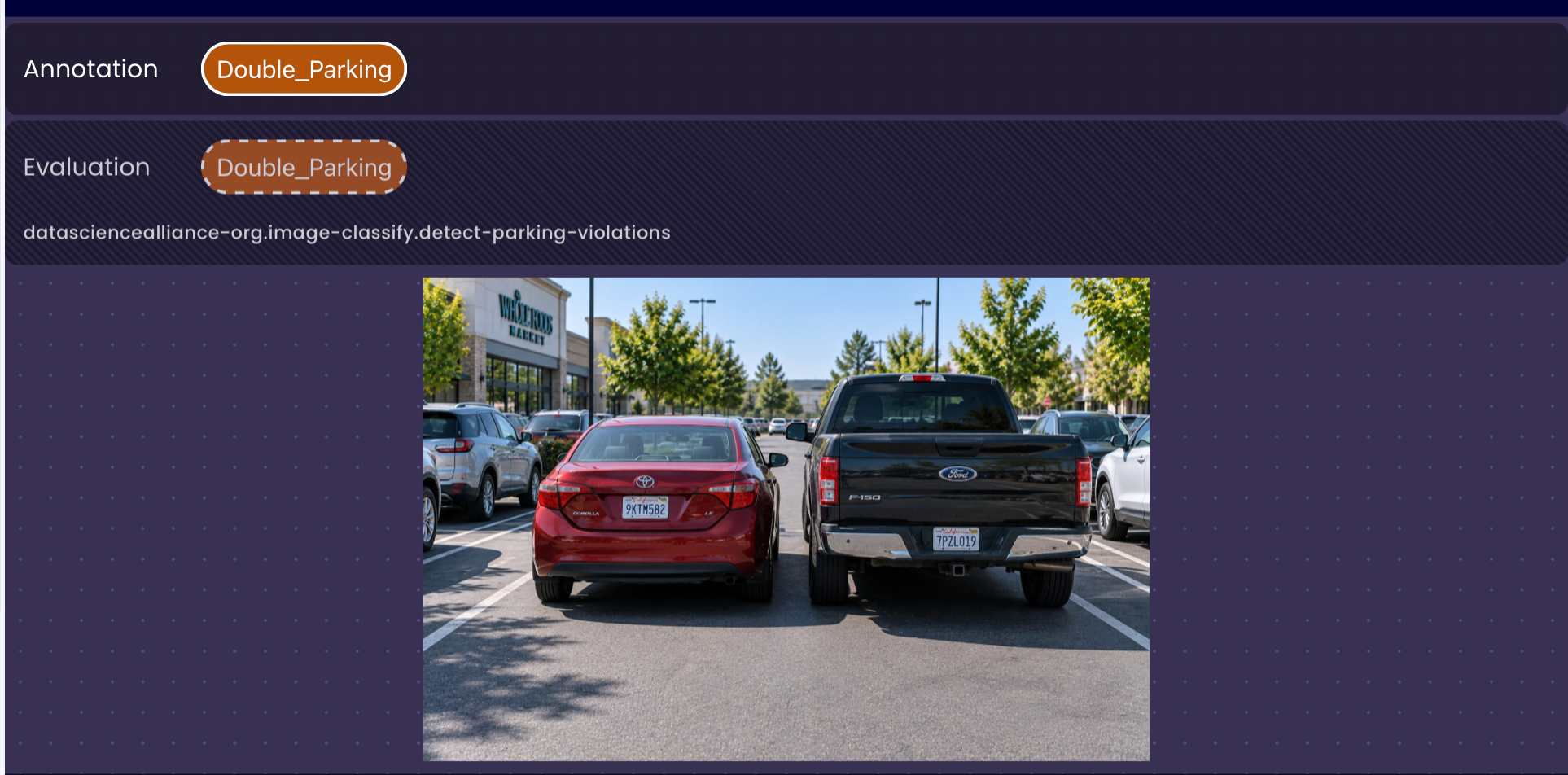
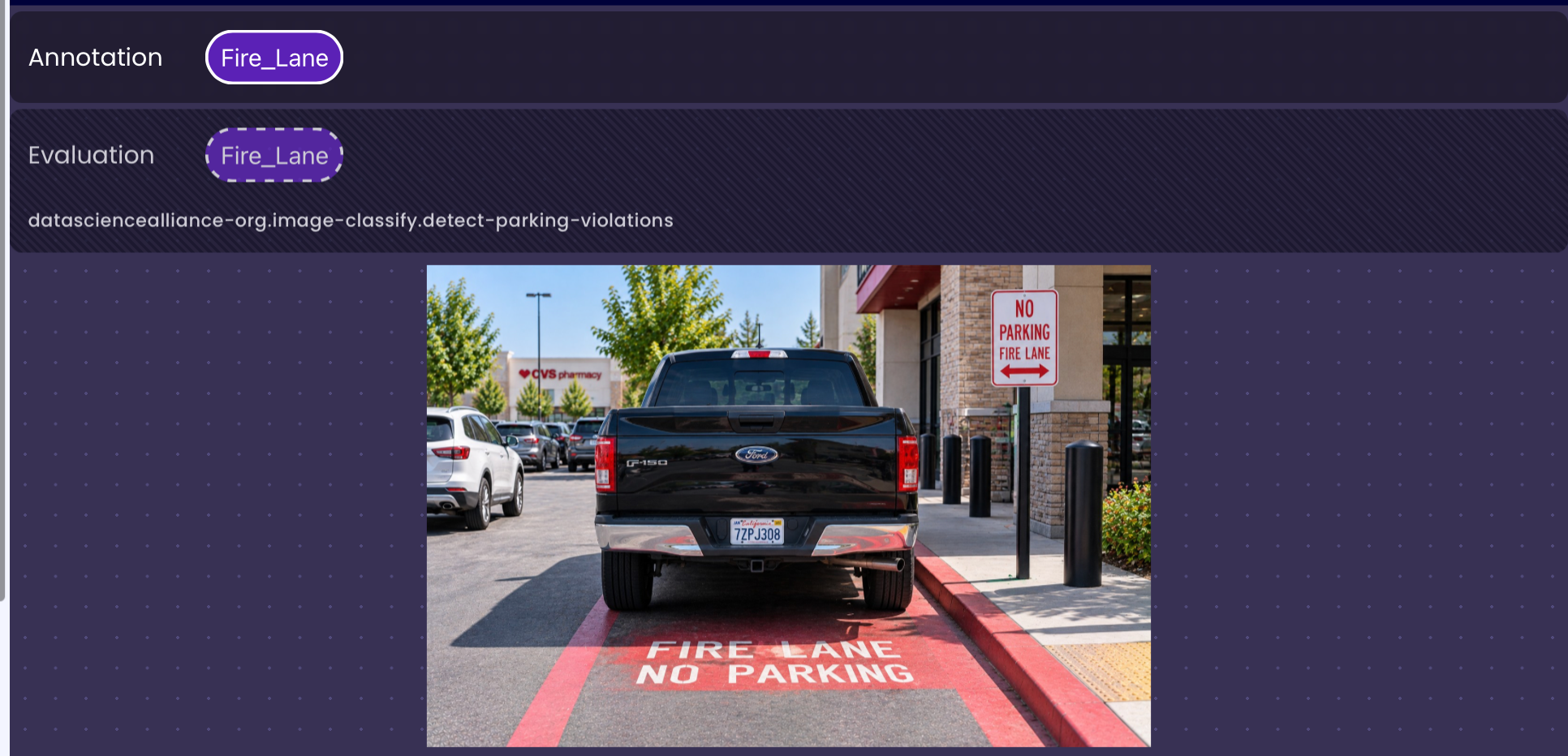
In contrast, a vehicle parked in a clearly marked accessible parking space without visible accessible parking authorization should be classified as Handicap_Misuse. A vehicle positioned directly next to an existing row of parked vehicles while occupying the adjacent travel area should be classified as Double_Parking. A vehicle parked in an area explicitly identified as a fire lane should be classified as Fire_Lane.
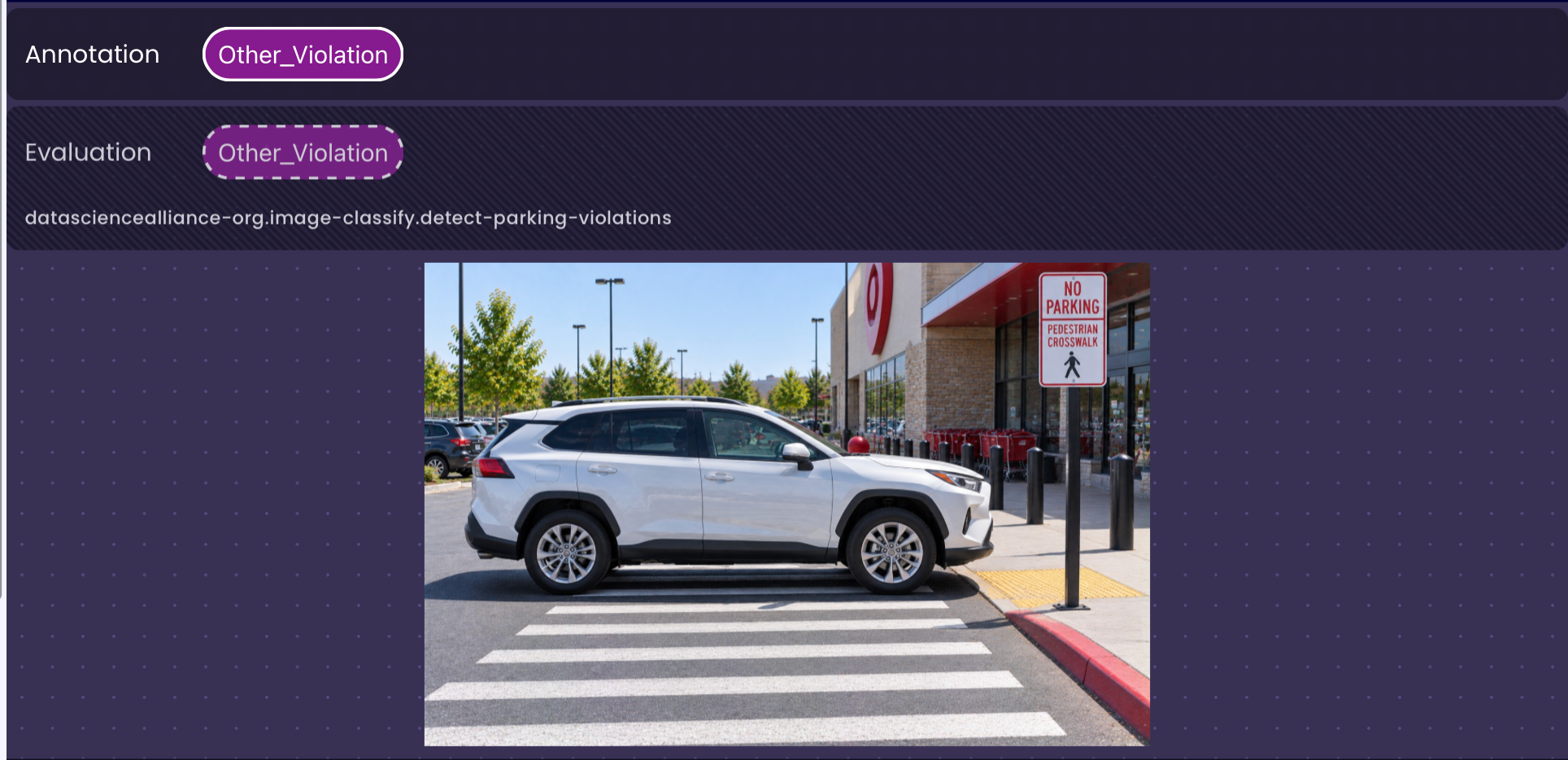
Other visible parking violations that do not fall into one of these specific categories, such as blocking a crosswalk, parking in a bus stop, parking beside a fire hydrant, violating a no-parking restriction, or improperly occupying multiple parking spaces, should be classified as Other_Violation.
The image will be classified into one of five class labels: Compliant, Handicap_Misuse, Double_Parking, Fire_Lane, and Other_Violation.
Step 1: Create an Ability
Go to the Abilities tab and select the button Create Ability.
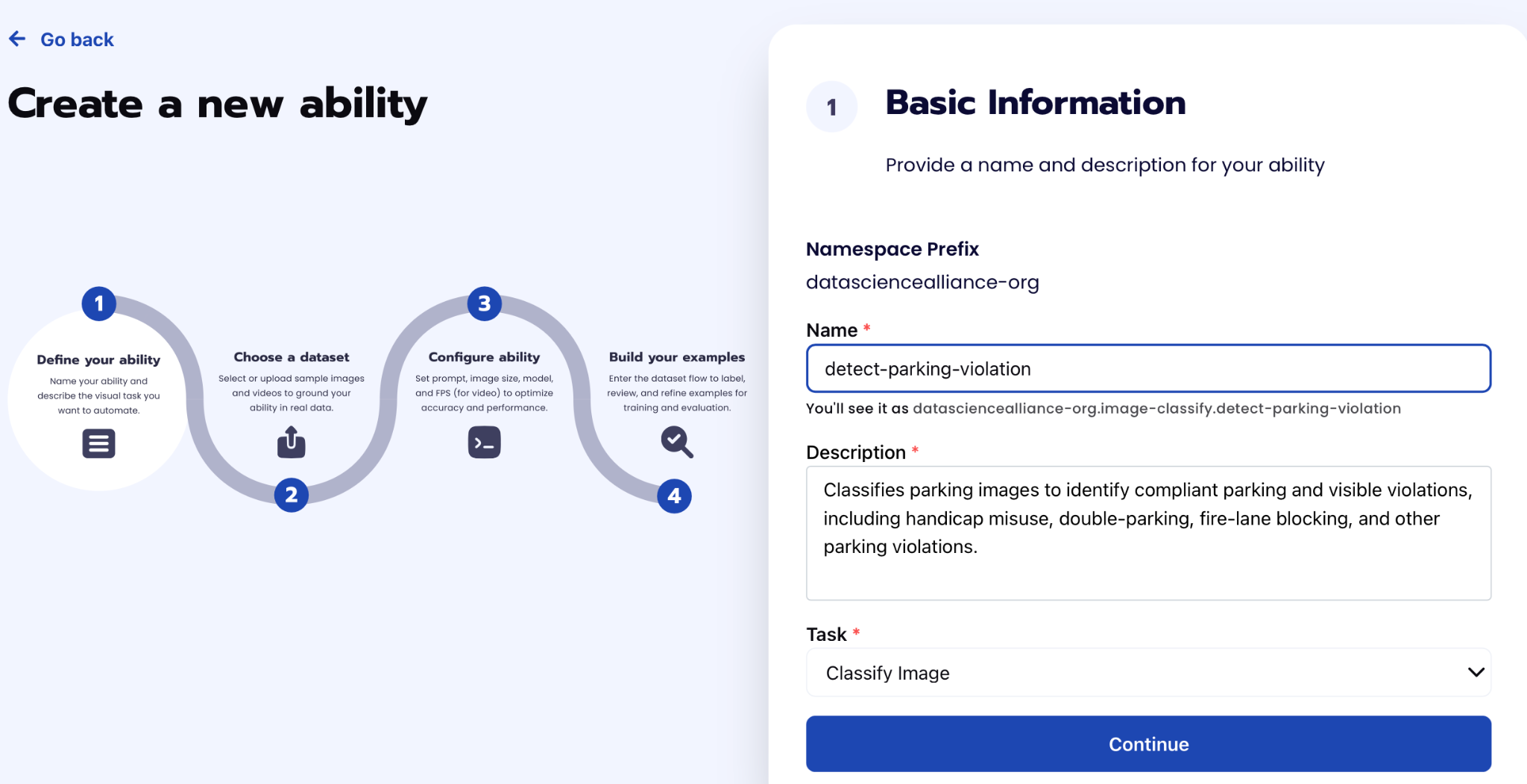
Fill out basic information about the ability such as its name and the description of the task itself. Since we are classifying an image, select the Task Type as Classify.
Step 2: Task Configuration
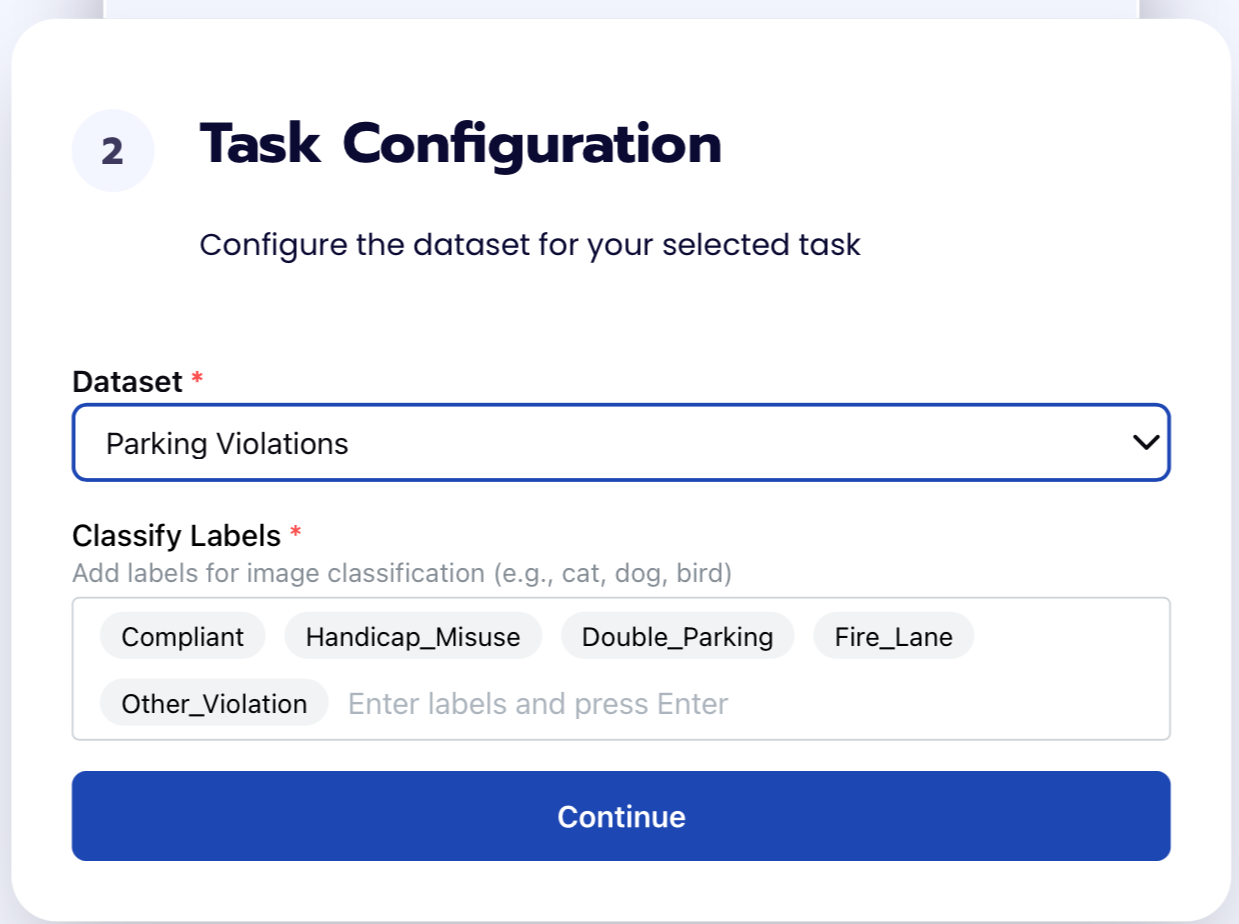
To configure the task, we need to select a dataset for the specific task. If you have already uploaded your images in a dataset simply select the name of your dataset. However, if you haven’t already done so then select <New Dataset> and upload your images and create the labels : Compliant, Handicap_Misuse, Double_Parking, Fire_Lane, and Other_Violation.
You need to label the samples in the dataset to be able to evaluate the ability later.
Step 3: Configuration
Our next step is to configure the prompt, select the model, and image size. For this use case, we recommend using the below prompt and settings for highest accuracy and best results.
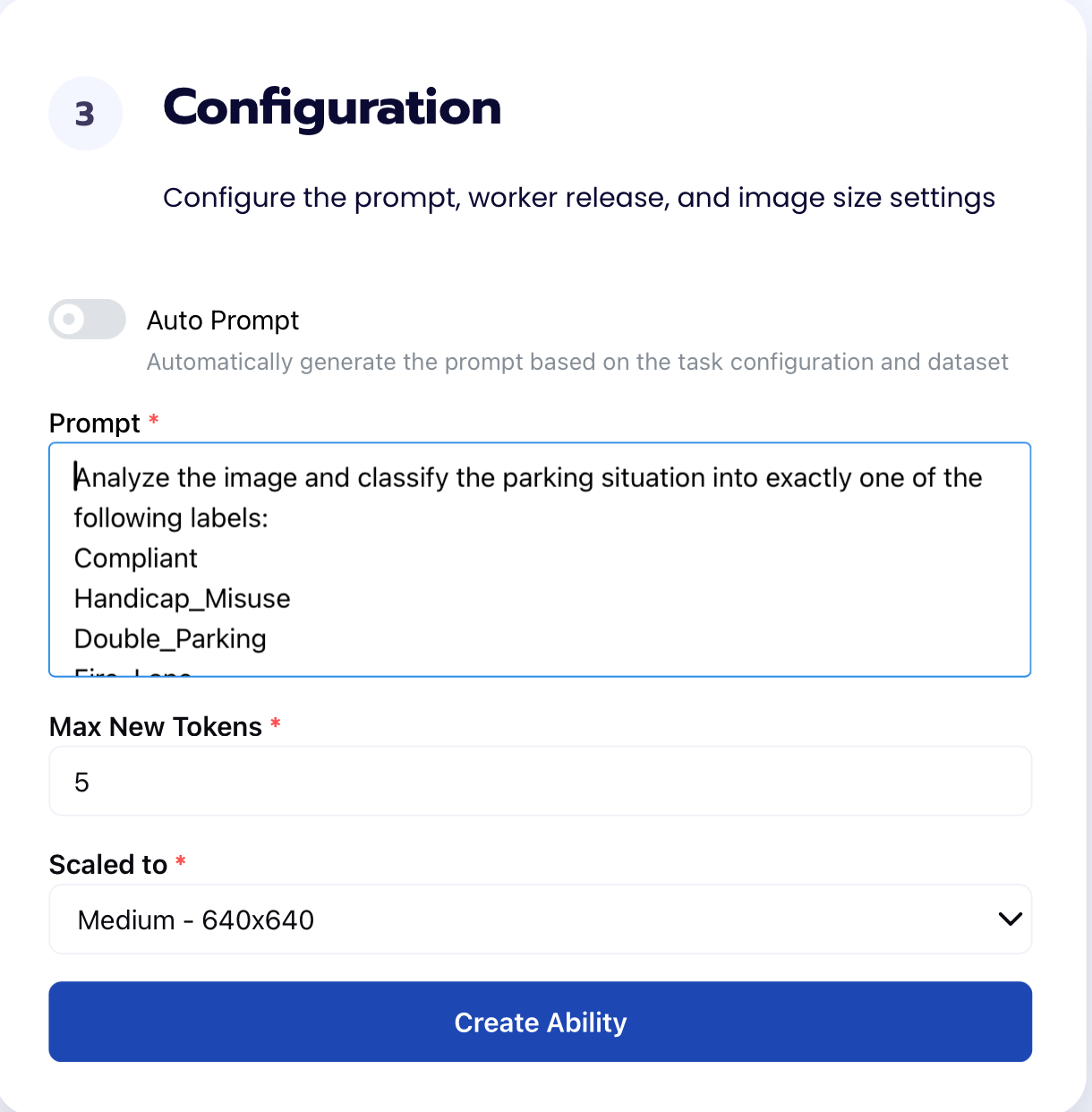
Prompt:
Analyze the image and classify the parking situation into exactly one of the following labels:
Compliant
Handicap_Misuse
Double_Parking
Fire_Lane
Other_Violation
TASK
Determine whether a vehicle is parked normally and legally based only on visible evidence in the image.
Inspect the vehicle's position relative to:
- other parked vehicles,
- traffic and parking lanes,
- parking-space boundaries,
- signs,
- pavement text and symbols,
- curbs,
- restricted areas.
If the vehicle's position conflicts with a clearly visible parking restriction, marked parking space, restricted area, or normal parking arrangement, a parking violation is present.
Choose the most specific applicable label.
LABEL DEFINITIONS
Double_Parking: A vehicle is double parked when it is positioned directly next to and generally parallel to a vehicle or row of vehicles that is already normally parked, while occupying the adjacent travel or circulation area instead of a valid parking space.
VISUAL PATTERN TO DETECT (ground your decision in these concrete cues, not just the abstract definition):
- A row of vehicles is parked normally (aligned with a curb, wall, or painted lines).
- A second vehicle sits directly beside that row, further out into the lane/aisle than the parked row.
- There is a visible gap, lane, or driving surface between the parked row and the second vehicle (rather than the second vehicle being flush against a curb or within its own painted lines).
- The second vehicle's wheels or body are not contained within any visible parking-space boundary.
- The second vehicle blocks or narrows the path other vehicles would use to pass or exit.
Any ONE of the above spatial cues, combined with the vehicle appearing inactive (see below), is sufficient evidence for Double_Parking. You do not need all cues to be simultaneously and unambiguously visible.
Strong parked/inactive-vehicle cues include:
- no visible driver,
- no visible passengers,
- headlights and brake lights are off,
- the vehicle appears stationary in its position.
The absence of a visible driver is especially important evidence that the vehicle is parked. Do not require hazard lights, an open door, or other special indicators. Do not require proof that the vehicle has been stationary for any specific amount of time.
DO NOT return Double_Parking only when: two vehicles are each individually contained within their own separate marked parking spaces, side by side, with no gap or lane between the row and the vehicle in question, and no part of either vehicle extends into a travel lane. This is the ONLY configuration that should be read as normal adjacent parking rather than Double_Parking.
REFERENCE ROW MUST BE ON THE SAME SIDE: The "row of normally parked vehicles" used to judge Double_Parking must be on the same side of the road/aisle as the vehicle in question, with no active travel lane or road-centerline (e.g., a double yellow line, single yellow line, or two-way traffic lane) running between them. Vehicles visible on the opposite side of a street, across a marked driving lane or centerline, do NOT count as a reference row — that is simply oncoming/opposite-side parking or traffic, not a double-parking configuration. If the only "row" the vehicle is beside is across such a lane or centerline, do not classify as Double_Parking; evaluate the vehicle's own position (e.g., against a curb, sign, or restricted area) under the other categories instead.
DECISION RULE: If a vehicle visibly forms a second row beside a normally parked row or vehicle, do not default to Compliant because painted lines, exact lane boundaries, or the vehicle's full silhouette are hard to make out. Partial occlusion or unclear lane markings are not grounds for Compliant when the second-row spatial arrangement itself is visible. Resolve ambiguity in favor of Double_Parking whenever the second-row pattern is present.
BOUNDARY WITH OTHER_VIOLATION: Double_Parking specifically requires a visible reference row or vehicle that is already normally parked, with the vehicle in question positioned parallel and adjacent to it. If a vehicle blocks or obstructs a travel lane, aisle, or driveway but there is NO clearly visible row of normally parked vehicles that it is positioned against, do NOT classify as Double_Parking. Do not extend the "resolve ambiguity toward Double_Parking" rule to cases lacking a visible parked reference row.
IMPORTANT — CHECK FIRE_LANE AND HANDICAP_MISUSE FIRST: Before falling back to Other_Violation in the case above, first check whether the vehicle's actual stopping/parking position is within an area explicitly marked as a fire lane (signage or "FIRE LANE" pavement/curb text visible anywhere near where the vehicle sits, even if the vehicle is not directly touching the curb) or a marked accessible space. A vehicle stopped in a lane that runs directly alongside a curb or building marked "FIRE LANE" is still in that fire lane even if it hasn't pulled fully up to the curb — the restriction covers the full width of that access lane, not just the painted curb strip. If such marking is present, return Fire_Lane or Handicap_Misuse as appropriate, NOT Other_Violation, even though the vehicle is also technically "blocking a lane."
Key visual pattern: normally parked vehicle(s) + another inactive vehicle directly next to them, sitting further into the travel/circulation area = Double_Parking. (No visible parked reference row, but vehicle still obstructs a lane/aisle/driveway = Other_Violation, not Double_Parking.)
Handicap_Misuse: A vehicle is parked in a clearly marked accessible or disabled parking space or access aisle without visible accessible parking authorization.
Identify an accessible parking area using visible evidence such as:
- accessible parking signs,
- wheelchair symbols,
- blue accessible-space markings,
- striped accessible access aisles.
If a vehicle clearly occupies an accessible parking space or access aisle and there is no clearly visible accessible parking placard, permit, or disability plate, return Handicap_Misuse.
Do not return Compliant merely because the windshield or license plate is difficult to inspect.
If the accessible parking area is clearly visible and no accessible authorization is visibly identifiable, favor Handicap_Misuse.
Fire_Lane: A vehicle is parked or stopped in an area explicitly identified as a FIRE LANE.
Only return Fire_Lane when visible text, signage, or pavement markings explicitly identify the area as a fire lane.
Explicit fire lane identification includes any of the following, even if only partially visible or legible:
- "FIRE LANE" painted on pavement or curb,
- "FIRE LANE - NO PARKING" or similar combined text,
- "FIRE LANE - TOW AWAY ZONE" or similar combined text,
- a standalone fire lane sign,
- "FIRE LANE" text painted directly on a red curb.
A partial, angled, or partially obscured view of this text or signage is still sufficient — do not require the full phrase to be perfectly legible or read head-on. If enough of the text is visible to reasonably conclude it says "FIRE LANE" (e.g., "FIRE LAN_" or "_IRE LANE"), treat it as explicit identification.
Do NOT infer Fire_Lane from:
- a red curb alone,
- a red line alone,
- a fire hydrant,
- a generic NO PARKING sign,
- a NO PARKING ANY TIME sign,
- a tow-away sign.
If parking is prohibited but the area is not explicitly identified as a fire lane, return Other_Violation.
Other_Violation: A clearly visible parking violation is present, but it does not meet the definition of Double_Parking, Handicap_Misuse, or Fire_Lane.
Use Other_Violation when the vehicle visibly conflicts with a parking restriction, restricted area, traffic-control area, or marked parking-space boundary.
Relevant visual evidence includes:
- NO PARKING or other prohibitory signs,
- bus-stop or reserved-area markings,
- crosswalks,
- fire hydrants,
- sidewalks,
- entrances or driveways,
- parking-space boundaries,
- other clearly marked parking restrictions.
A vehicle that substantially occupies more than one marked parking space or straddles parking-space boundaries is improperly parked and should be classified as Other_Violation.
VISUAL CUES FOR STRADDLING/MISALIGNMENT (do not require the vehicle to be dramatically off-center — subtle misalignment still counts): a painted space-boundary line passes through or very close to the body of the vehicle rather than running clearly along its side; the vehicle sits at a visible angle/skew relative to the painted lines rather than parallel to them; the gap to one neighboring vehicle is noticeably tighter or wider than the gap to the other, suggesting the vehicle is not centered in its space. Any one of these is sufficient to classify as Other_Violation rather than Compliant.
PARKING IN AN UNMARKED TRAVEL LANE OR NEAR TRAFFIC CONTROL: A vehicle stopped or parked directly on a roadway, drive aisle, or travel lane — i.e., NOT within any marked/striped parking space — immediately at or beside a stop sign, stop line, intersection, or crosswalk is a violation even if no explicit "NO PARKING" sign is visible for that exact spot. Occupying part of the roadway itself at a traffic-control point is sufficient evidence of Other_Violation; do not require a posted sign in every case, and do not default to Compliant just because no prohibitory sign is visible.
Compliant: No clearly visible parking violation is present.
Return Compliant only when the vehicle's position does not conflict with:
- another row of normally parked vehicles (including no second-row/double-parking spatial pattern, see above, and only counting reference rows on the same side of the road — see REFERENCE ROW MUST BE ON THE SAME SIDE),
- an accessible parking restriction,
- an explicitly marked fire lane (including the full access lane alongside fire lane signage/curb text, not just the curb strip itself),
- another visible parking restriction,
- a restricted area,
- marked parking-space boundaries (the vehicle must be cleanly centered within its own space, not skewed or straddling a line — see VISUAL CUES FOR STRADDLING/MISALIGNMENT),
- and the vehicle is not stopped directly on a roadway/travel lane at a stop sign, intersection, or crosswalk outside of any marked space.
Compliant is NOT the default label for an uncertain violation. Before returning Compliant, explicitly check the Double_Parking visual pattern above — a second-row arrangement next to a parked row overrides Compliant even when some details are unclear.
Before returning Compliant, verify that none of the four violation categories above are visually supported.
CLASSIFICATION ORDER
Evaluate the image in this order:
- DOUBLE PARKING
If a vehicle forms a second row beside normally parked vehicle(s) and sits further into the adjacent travel or circulation area than that row: → Double_Parking (Apply the DECISION RULE above: resolve ambiguity toward Double_Parking, not Compliant, whenever this spatial pattern is present.)
- ACCESSIBLE PARKING
If the vehicle occupies a clearly marked accessible parking space or access aisle without visible accessible authorization: → Handicap_Misuse
- FIRE LANE
If the vehicle occupies an area explicitly identified as a FIRE LANE: → Fire_Lane
- OTHER PARKING VIOLATION
If another visible parking restriction, restricted area, traffic-control area, or parking-space boundary is violated: → Other_Violation
- COMPLIANT
Only if none of the above conditions apply, AND the vehicle is either within its own marked space or in an otherwise unmarked/unrestricted area with no second-row pattern: → Compliant
FINAL RULES
- Return exactly one label.
- Evaluate the violation categories before considering Compliant.
- Use the most specific applicable violation label.
- Do not use Compliant simply because a violation is difficult to classify.
- For Double_Parking, focus primarily on the second-row spatial arrangement; partial occlusion of lines or exact boundaries is not grounds to fall back to Compliant.
- Do not require proof that a double-parked vehicle has been stationary for a specific amount of time.
- If a vehicle clearly forms a second row beside normally parked vehicles and sits further into the travel area, classify it as Double_Parking unless there is clear evidence that it is actively moving (e.g., visible driver actively maneuvering, motion blur, brake/turn signals engaged).
- Do not confuse vehicles parked in separate valid parking spaces (each fully contained in its own marked space, flush with the row, no gap/lane) with Double_Parking.
- For accessible parking, if the accessible restriction is clear and no authorization is visibly identifiable, favor Handicap_Misuse.
- Fire_Lane requires explicit fire-lane identification.
- Do not infer Fire_Lane from curb color, a hydrant, or a generic NO PARKING sign alone.
- If a clear violation exists but does not match the three specific violation categories, return Other_Violation.
- Respect visible parking-space boundaries.
- Use only visually observable evidence.
- Return only the label with no explanation, punctuation, confidence score, or additional text.
Return only one of these exact labels:
Compliant
Handicap_Misuse
Double_Parking
Fire_Lane
Other_Violation
Step 4: Run Evaluation
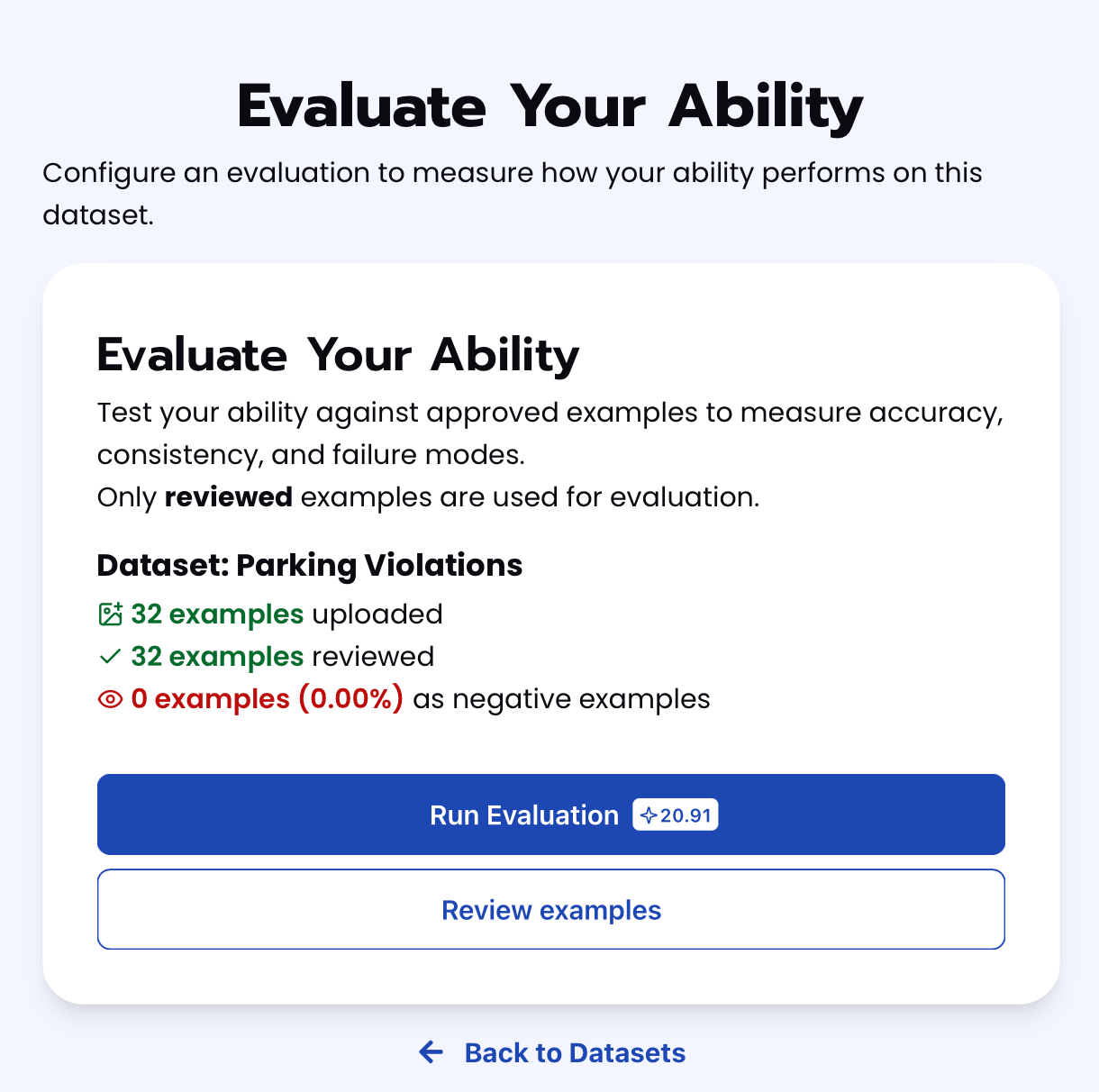
To check how well the prompt does against the dataset, our next step is to run the evaluation. If needed, review the examples in your dataset to ensure all necessary images can be used in the evaluation.
Step 5: Check Evaluation
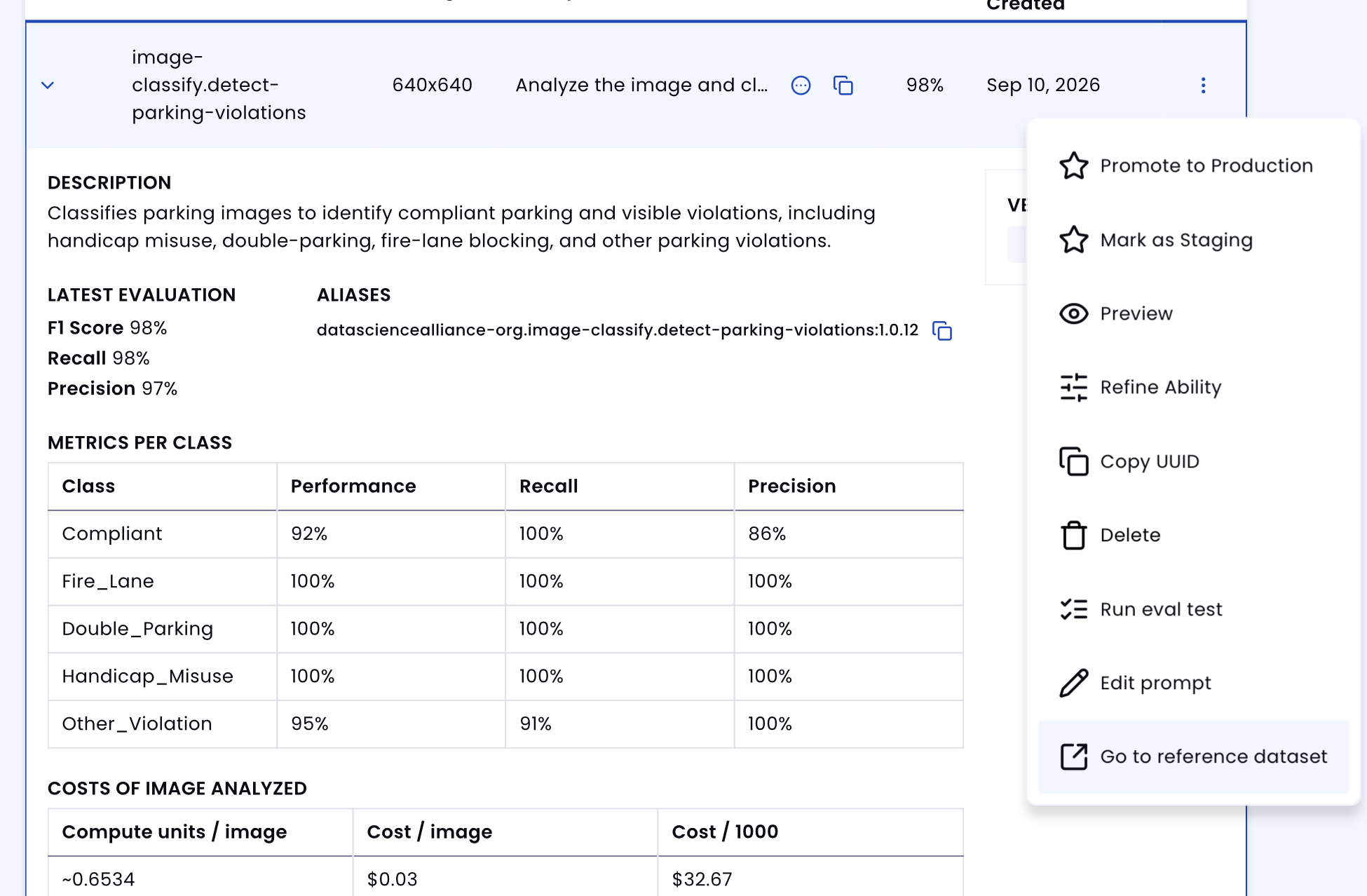
All evaluations can be reviewed in the Abilities tab by clicking the dropdown arrow next to the associated ability-alias. Evaluations can take around 15-20 minutes to complete based on the size of the dataset.
In addition to the performance, recall, and precision percentages on the Abilities tab, you can see a visualization of what the model predicted by revisiting the dataset. Click on the three dots and select "Go to reference dataset". Select one of the images in the dataset and click on the review button. After running the evaluation, you can see what the model prediction results for each image and compare it to the annotation. With this, you can improve your prompts and thus improve your accuracy.
Tips for Accuracy
1. Explicit "Negative" Cases
Just like "normal wear" needs an exclusion in a vandalism prompt, this task needs explicit call-outs for configurations that look like a violation but aren't. Without them, the model defaults to over-flagging.
In this prompt, the negative cases we ended up needing were: two vehicles each fully contained in their own marked space with no gap between them (not Double_Parking); vehicles across an active travel lane or road centerline from each other (not a valid Double_Parking reference row, even though they're "parallel and adjacent"); and a red curb, hydrant, or generic "NO PARKING" sign alone (not sufficient for Fire_Lane without explicit "FIRE LANE" text or signage). Each of these exists because the model was pattern-matching on a superficial cue — proximity, red paint, a nearby sign — rather than the actual defining condition.
2. Define Edge Cases
The boundary between adjacent labels is where most of the accuracy is won or lost. For this task:
- A vehicle blocking a lane/aisle with a visible parked reference row (Double_Parking) vs. blocking a lane without one (Other_Violation) — same obstruction, different label, depending entirely on whether a reference row exists.
- A vehicle stopped in an access lane next to fire lane signage but not touching the curb — still Fire_Lane, since the restriction covers the lane, not just the painted strip, but easy to misread as merely "blocking traffic" (Other_Violation).
- A vehicle parked at a slight skew or with uneven gaps to its neighbors (Other_Violation, straddling) vs. one that's simply parked a little off-center within a generously sized space (Compliant).
- A vehicle stopped in an unmarked lane at a stop sign or intersection with no posted sign (still Other_Violation — the absence of a sign isn't a free pass when the vehicle is on the roadway itself, not in any marked space).
- Handicap space with a placard that's genuinely hard to see due to camera angle/glare vs. a space with no placard at all — the rubric has to say which way to default when visibility itself is the ambiguity.
3. Use Balanced Examples
Balance matters two ways here: across the five classes, and within the violation classes. If Fire_Lane examples are mostly clean, head-on shots of curb text, the model may fail on angled or partially obscured signage (as it did in our fourth round). If Double_Parking examples always show a same-side reference row, the model won't learn to reject cross-street false positives. If Other_Violation is dominated by sign-based cases, the model may underperform on non-signed violations like stop-sign encroachment or space-straddling, since it starts expecting a posted sign as a prerequisite for any violation.
4. Use Synthetic Images Carefully
Vary the environment (street parking, mall lot, garage, curbside loading zone), lighting (day, dusk, artificial/night), and camera angle (straight-on, angled, partially obstructed by trees or other vehicles) so the model doesn't learn "violation" as a visual style rather than a spatial/semantic condition.
For Compliant examples, the vehicle should be unambiguously within its own space or a clearly unrestricted area, with no adjacent row, sign, or marking that could be misread as a violation. For each violation class, make the defining evidence clear and unambiguous — a legible (even if angled) fire lane sign, a clearly second-row vehicle beside a same-side parked row, a clearly skewed vehicle relative to its space lines — rather than borderline cases that could plausibly belong to Compliant. Save the genuinely ambiguous cases for a separate evaluation set used to stress-test the prompt, not for training the base rules.
Example Results:
Get early access
Want to move faster with visual automation? Request early access to Abilities and get notified as new vision capabilities roll out.